🎲 Dice Games
Twenty-one dice games keeping scores are supported. You can also make your own dice combinations for your games.
We’re building a powerful dice rolling app for game masters, tabletop, and casual players — delivering faster and smarter game support.
Your contribution plays a crucial role ensuring the project’s continued growth.

This update supports iOS 26.5. We have listened to you. This app is packed with many of your requests (and a few surprises.)
Twenty-one dice games keeping scores are supported. You can also make your own dice combinations for your games.
Eight sleek, "Gems & Metals" style themes to match your mood or game-night vibe.
Long-requested by role-players and war-gamers, we now have Dice Polls and Dice Subset Totals support to roll big, roll bold and roll strategically.
Faster, punchier, and way more dramatic. The dice don’t just roll—they perform.
The user interface is updated from your feedback. Results are well centered in the app views for quick feedback of your game actions and rolls.
Dice Shouts delivers periodic notifications featuring dice facts, gaming lore, history, jokes to keep tabletop gaming inspiration active even when the app is closed.
Updated updated editor keys (some with swipe actions) that's cleaner, smoother, and easier to customize your dice sets expressed in common dice notation.
Deeper, richer roll logs with more detail than ever.
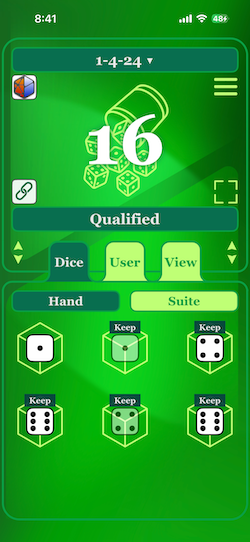
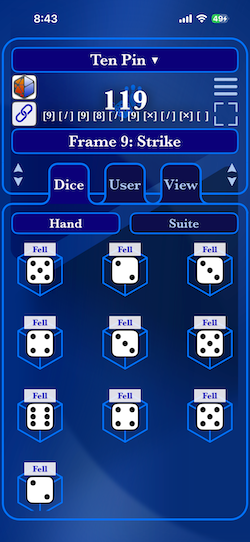
You wanted dice games with the app following individual game rules to keep score in the app — now you go 'em! — twenty-one dice games are supported.
The 3.0 update supports popular tavern games such as Craps, 1-4-24, 6-5-4, Chicago, Going to Boston.
We also have sports game such as Golf and Bowling (ten pin, duck pin and candle pin versions), Draw Poker and even a Dreidel are ready for play.
Parlor games of Crystal Ball, Treasure and even Rose Petals are offered in the app.
There are also "push your luck" dice games such as Pig and Five Thousand / Ten Thousand.
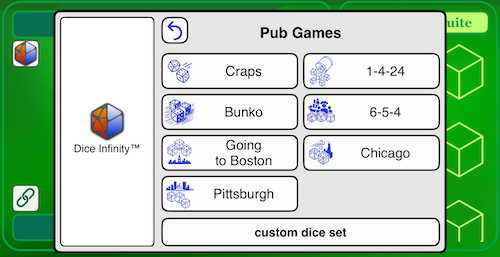
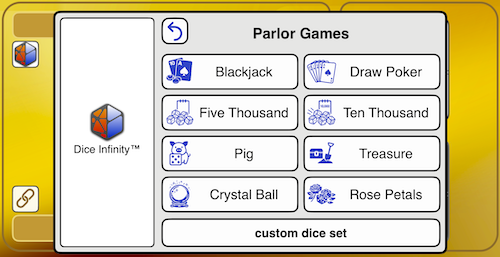
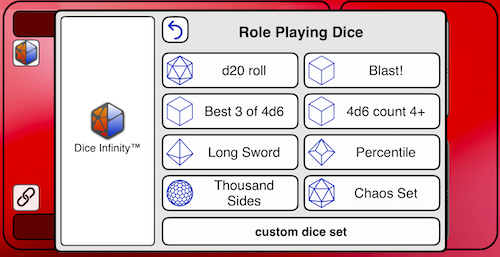
Just choose what game you want to play from the app's Game Chooser that pops up at the launch and have fun!
There is also the Pittsburgh dice game a fast, fun, push-your-luck dice game inspired by the City of Bridges and the Steel City spirit. Players roll, keep, and score dice across three rounds, aiming for high-scoring combinations while chasing exciting bonuses.
Pittsburgh Dice Game Overview:
Give this new game a try!

One of the most custom configurable dice apps. A custom dice editor allows you to have up to four different types of dice in a single set. Just type in the dice formula. There are even display options where the dice sum, dice pool count, face count, or even dice sum subset are displayed for your rolls.
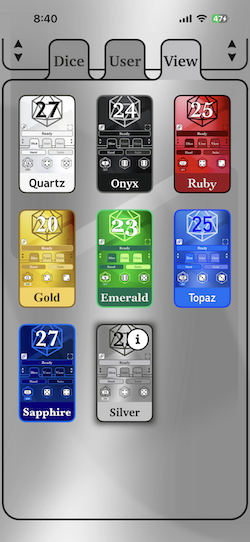
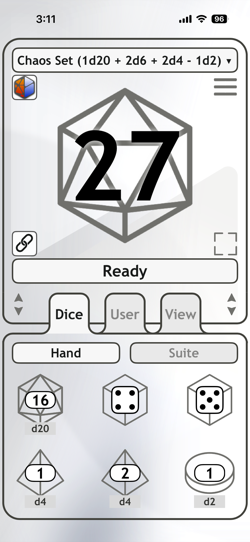
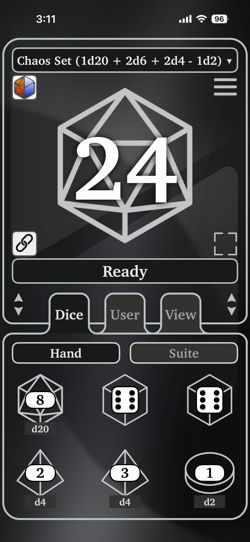
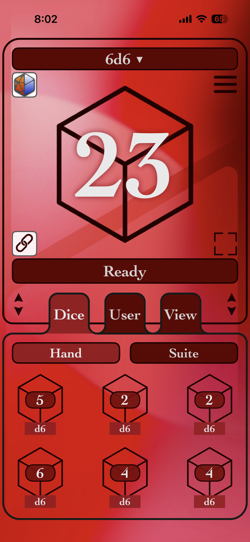
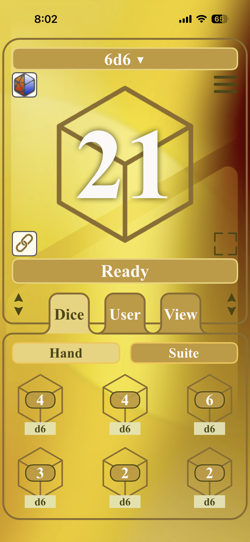
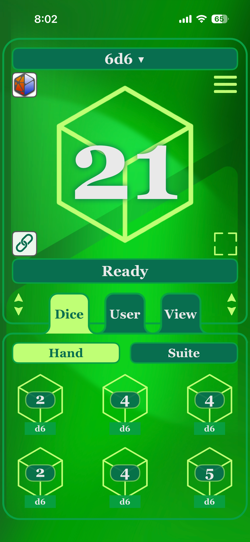
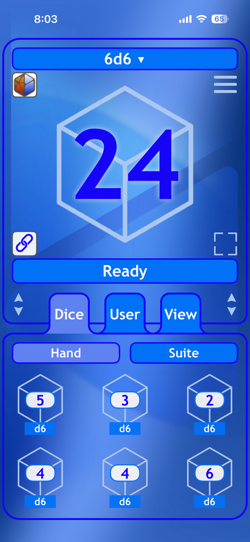

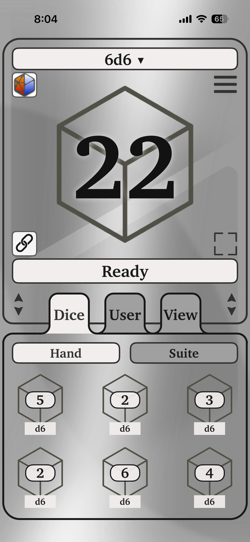
The inevitable "What colors?" discussion came about during app development. We decided on different color options to fit your style. The app offers themes of a "Gems & Metals" style such as quartz, onyx, ruby, gold, emerald, topaz, sapphire, and silver.
Many more different themes are in progress!
What games can I play?
The app is designed for many types of dice games. We currently support rules and scoring for the following games.
What about common board games and casual dice games?
You can use this app to roll dice for board games and casual dice games. You may need to use the dice set editor to customize a dice set for the game played.
How about tavern games where dice are rolled from cups?
We found that rolling dice with this app in bars, taverns and pubs is quite popular. Its very handy when an establishment does not have dice available.
Are games where you roll the dice, keep some and re-roll the rest supported?
This style of play is supported. You can individually choose which rolled dice to keep and then re-roll only the un-kept dice for each round. Tap on the rolled dice and select "Keep" to omit that rolled dice from the next set roll.
Is this app suitable for tabletop RPG games?
Yes, it's designed to work with many games that use dice including RPGs.
Planning to support other game rules?
We are constantly looking at popular dice games to support. Public interest and input is welcome.
What types of custom dice can I roll with this app?
You can roll from a d2 (coin flip) to a d5000.
How many custom dice can I roll in a single set?
The app supports from one to a hundred dice per dice set.
Can I roll different types of dice at once?
Yes, you can roll up to four different types of dice at once. Simple compound dice sets of "1d8 + 1d4 + 1" are supported. A chaos dice set of "1d20 + 2d6 + 1d4 - 1d2" is in the Game Chooser to show how complex dice sets can become for game play.
How can I view the results of my dice rolls—either as a total or by counting individual die faces?
The app lets you customize how roll results are shown:
How are dices set displayed?
Dice set are displayed in different ways across the app. The main and dice set views uses the name of the dice game or common dice notation. The dice hand view shows each individual dice in the current chosen dice set.
Are there any details kept about dice sets once entered and rolled?
Yes, tap on the dice set and select the "Info" menu option. The dice count, roll average, and last roll time are displayed.
Can I use dice in this app as a score keeper or a manual counter?
Yes, define a dice set with a single die. Swipe on up and down on the dice in the main display to step the displayed value. You can still roll the dice by tapping on it.
Does the app include sound effects during rolls?
Yes, realistic dice sound effects enhance the experience during animations.
What is the dice roll animation playtime?
The dice roll animation is just under two seconds long. A common period to manually roll dice.
Can the dice roll quicker?
Yes. You can double-tap the middle of the message bar (just below the link button) for a "Quick Roll" or select this option under the hamburger menu.
What are Dice Shouts?
Dice Shouts are app notifications with some fun and informative facts about dice. They appear as app notifications. They can be turned on and off as desired.
Can I see a history or log of my previous rolls?
Yes, the app keeps a log of your rolls from either custom dice sets of dice games so you can review your results anytime.
How do you export the dice roll log of this app?
Dice roll histories can be copied into the iOS clipboard to paste into other apps that accept text from the clipboard. Go to the Log view, tap on a log entry, and select a "Copy ..." menu item.
Will spreadsheets apps accept the exported roll history?
The export format was specifically designed for spreadsheets. The data copied into the clipboard from the app is in comma-separated values (CSV) for imports into spreadsheet apps.
Are the dice rolls randomized fairly?
All dice rolls are simulated using the iOS randomization functions where there is equal probability of each dice face showing in a given simulated die.
How is the dice roll determined?
The app uses Apple's built-in iOS randomization functions to generate each roll. This resource is also used for security and other features.
Does the app work offline without internet access?
This app release (v3.0) is fully functional offline and requires no internet connection.
What if my device has Bluetooth or WiFi turned off?
That app currently does not require any wireless connection to run.
Can the app support both vertical and horizontal screen orientations?
The app is fully responsive and supports both portrait and landscape modes on all supported iOS devices.
Are there any easter eggs or obscure features in the app?
It would not be a real Silicon Valley-built app if we did not have rabbit holes! Hint -- try taps, double-taps, and swipes in different places to see what happens.
How do I create, edit, save, or delete dice sets?
The app has two ways to make custom dice sets:
Can I change the app’s theme or appearance?
The app currently supports the following themes in a "Gems & Metals" suite.
How do I give a custom name to a dice set?
Yes, select "Set Label" in the app icon menu. A view shows to enter text to give your dice set a custom name. This name is shown below the dice set icon.
Are the sizes of the views adjustable?
You can resize the dice view from the "hamburger" menu for a full view of the dice roll of a shared view with the tabs. You can also adjust the tab position by dragging one of the neighboring, two-headed arrow icons.
Where can I disable the shake action, roll vibrations, or sounds?
You can toggle shake action, roll vibrations, and sound effects under the User tab.
What platforms does the app run on?
The app supports current the Apple devices. The primary focus is the iPhone. The app runs as an "iPhone-sized app" on the Apple Mac and iPad.
What specific Apple devices can run this app?
The app runs in a minimum of iOS 15.8.5 or greater for the iPhone and iPad. It also runs on Apple Silicon-based Macintoshes.
Is the app available for Android devices?
We truly appreciate your interest! At this time, the app is available exclusively for Apple devices. We are always evaluating future platforms based on user demand.
Will my dice roll data be shared or collected by the app?
No. The app does not collect any personal data. Only anonymous statistics from the App Store are viewed.
Are there subscriptions or in-app purchases?
No subscriptions are required for the current release. Some advanced features may be available as one-time purchases or subscriptions in future updates.
Who can I contact regarding investment or partnership opportunities?
We ask that all investment or partnership proposals be made via a formal mailed letter, direct phone call derived from the information on this website or our Discord server.
Born from basement gaming sessions around a poker table in a suburb, a lifelong passion for board games and role-playing games blossomed into decades of tech innovation. This app’s development was shaped by my careers, family, and contributions to early to modern mobile systems, including the pioneering Dice Roller app for the Apple Newton, showcased at the Origins Game Fair in July 1994.
When my kids discovered tabletop RPGs, they eagerly downloaded dice apps on their phones. After sharing my insights, my son challenged me with a question: “Dad, can you make a better dice app?” My enthusiastic response was a resounding yes.
Two years of funded development, fueled by my experience in mobile, UX, and device design, culminated in the creation of Dice Infinity. This elegant, fast, and clutter-free digital dice companion is crafted with a gamer’s heart and an engineer’s discipline. It’s always ready to spring into action whenever you need a dice roll or have a moment for a dice game.
Release Anthology
The journey of bringing this app to public use has been an exhilarating adventure. Here’s a list of key release milestones:
Free download. Enjoy!
The Dice Infinity app does not collect, store, or transmit any personal data from users. The only usage information we monitor comes from (1) aggregate, anonymous statistics provided by the Apple App Store developer portal and (2) traffic analysis of this website via Google Analytics.
You can contact us at the following address:
aHandSoft, Inc.
1821 South Bascom Avenue, Suite 164
Campbell, CA 95008
We can also be reached at our Discord server and Instagram account.



Dice Infinity™ is a trademark of aHandSoft, Inc.
Copyright © 2025 - 2026 aHandSoft, Inc. All rights reserved.